
We’ve spent the last year or so purchasing and trying out just about every Spanish language learning app on the market. As you’d expect, some were very good, some were just OK, and some were just plain bad. In this guide, we highlight the top 5 apps that we used and liked. If you’re looking for the best apps to learn Spanish, our guide breaks down the top Spanish language learning apps based on hands-on testing, features, pricing, and overall effectiveness. We’ve reviewed and ranked more than 20 different Spanish apps to help you choose the best Spanish learning app for your goals, level, and learning style.
Below, you’ll find our current rankings of the best Spanish apps, along with clear pros, cons, and recommendations for who each app is best for.
Video: Which Spanish Language App Is Best?
In the video above, Bianca from the Guide2Fluency team reveals her list of the best Spanish language programs online.
Rocket Spanish
- Free Trial
- 60-Day Money Back Guarantee
Pros
- We found the interactive audio lessons to be engaging and effective
- Uses Google’s speech software to perfect your pronunciation
- Standalone grammar lessons offer all the essentials in easy-to-understand chunks
- Loved the mix of drills after the audio lessons
- Excellent program structure with mix of audio, grammar and interactive drills
Cons
- Lessons are kind of long
- Not many visuals in this program (visual learners take note)
Rocket Spanish: The Best Spanish Learning App We Used
I don’t know why, but I wasn’t expecting much from Rocket Spanish – probably because I had never heard of the program before purchasing it. But I have to admit, I was shocked by how good this Spanish app is.
While most other apps feel too gamey or dumbed down, Rocket Spanish is a true language learning program. I don’t mean to imply that it’s overly academic – I wouldn’t say that – but it is definitely more comprehensive and deep than any other app I have used to date.
Amazing Audio Lessons
The Rocket Spanish program is built around audio instruction. If you boil it down, that is what this Spanish course is all about. They offer in-depth, 30-minute long audio lessons that are, in my opinion, amazing.
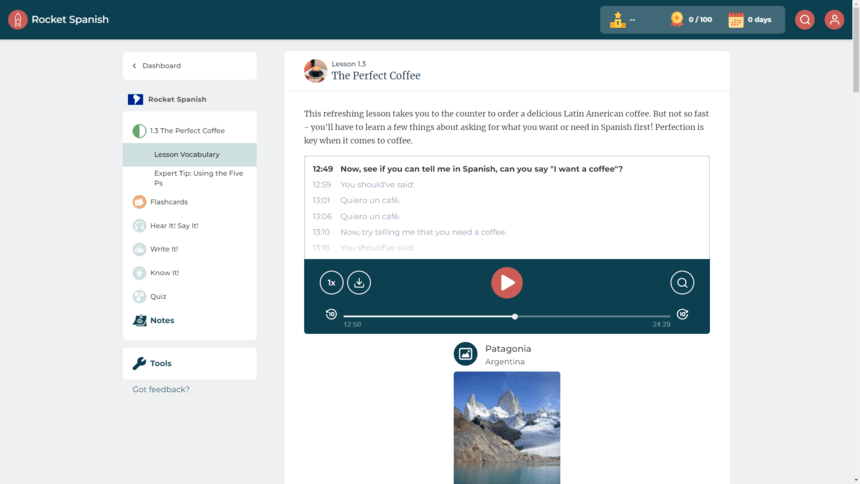
They aren’t listen-and-repeat type lessons like you would have found on CDs 20 years ago. Far from it. The lessons feature an English-speaking guide who walks you through each lesson. They explain what you’re learning about, define new words, and even ask you to participate.
It’s about as close to a live class as I have seen in pre-recorded form.
In short, these audio lessons are engaging, thoughtfully designed, and just plain effective. The vocabulary and guide’s points stick with you, and they offer a fast path to fluency.
Plus, Rocket’s “Play the Part” feature uses AI to provide you with intermediate to advanced conversation practice that’s especially helpful if you’re preparing for travel or real-world interactions.
Grammar Lessons
The crazy thing about Rocket Spanish is that the learning doesn’t stop with the audio lessons. I have used other language courses that focus on audio-based learning, but that is all they offer (see Michel Thomas). There are no other drills, exercises, or study materials associated with the program.
But not Rocket. In addition to the extended conversations that you listen to and join in with, they offer fun little drills like quizzes and flashcards to test you on what you learned, plus detailed grammar instruction.
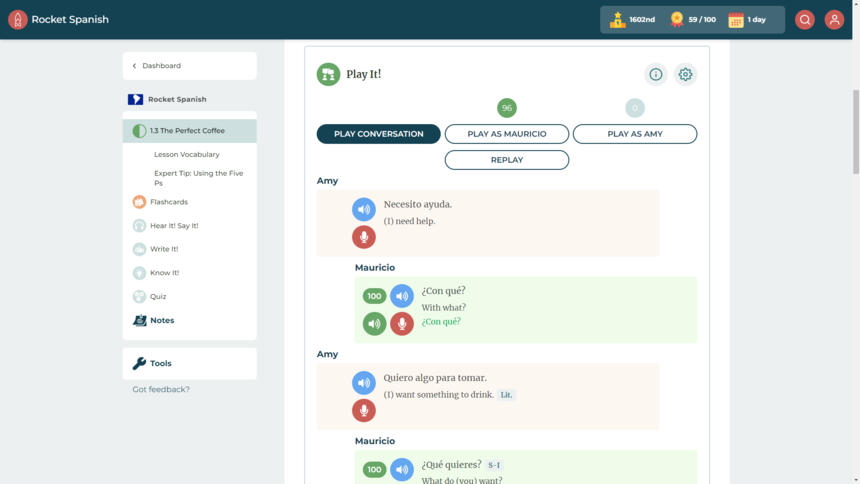
I loved the plain English descriptions around Spanish grammar, and I found these notes to be immensely helpful. Plus, they are littered with examples and quick questions to make sure you are understanding.
Quick Summary
Rocket Spanish is the most complete and effective language program we have used to date. With audio lessons, engaging exercises to work post-lesson, and in-depth grammar coverage, this program is a must for serious Spanish learners.
👉 Read Full Rocket Spanish Review
Babbel
- Several Subscription Options
- 20-Day Money Back Guarantee
Pros
- Lessons move fast and hold your attention
- Daily review sessions take just 2-3 minutes
- Tons of cool bonus features, like podcasts, games, and the Babbel magazine
- Grammar instruction is very easy to follow
- Affordable price tag (as low as $8/mo)
Cons
- Could use more verbal/speaking practice
- Speech recognition software is just OK
Babbel: The Best For Beginners & Budget Shoppers
Are you just getting into your Spanish learning journey and don’t want to break the bank? If so, Babbel is your answer. We found it to be the absolute perfect app for beginners and people on a budget.
Build Foundational Skills
I don’t think Babbel on its own will get you to total Spanish mastery. People that are just getting into their language learning journey often have this image in their mind of them sitting at a café speaking rapidly and fluently in Spanish.
I don’t want to burst your dream – you can absolutely get there – but it just won’t be Babbel taking you all the way across that finish line. Babbel is perfect for beginners trying to achieve intermediate fluency. Think ordering dinner, conversing with taxi drivers and shopkeepers, or holding basic conversations with a new friend.
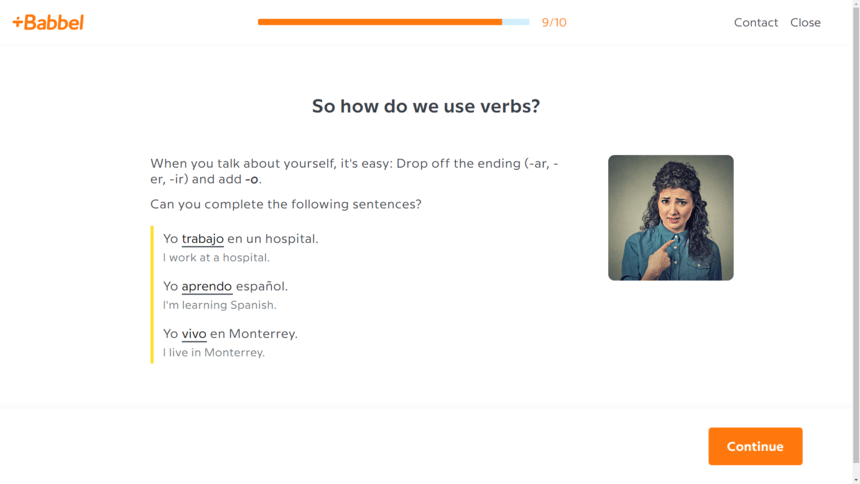
Babbel is great at building up your core knowledge. They start with one- and two-word phrases and work up from there.
They’ll teach you a couple thousand words, how to form sentences, how to conjugate verbs, and other necessities, but don’t expect to be reading books from Nobel Prize-winning novelist Gabriel García Márquez after completing the Babbel course.
And Babbel takes a really smart and fun approach to Spanish. Lessons only take 10 or 15 minutes each, and they are actually engaging and fun. They layer grammar instruction directly into lessons and mix things up frequently with different types of drills.
Amazing Value
At less than $10 per month, Babbel offers a ton of value. Most Spanish apps today cost $15+ per month (or a couple hundred dollars for a lifetime plan).
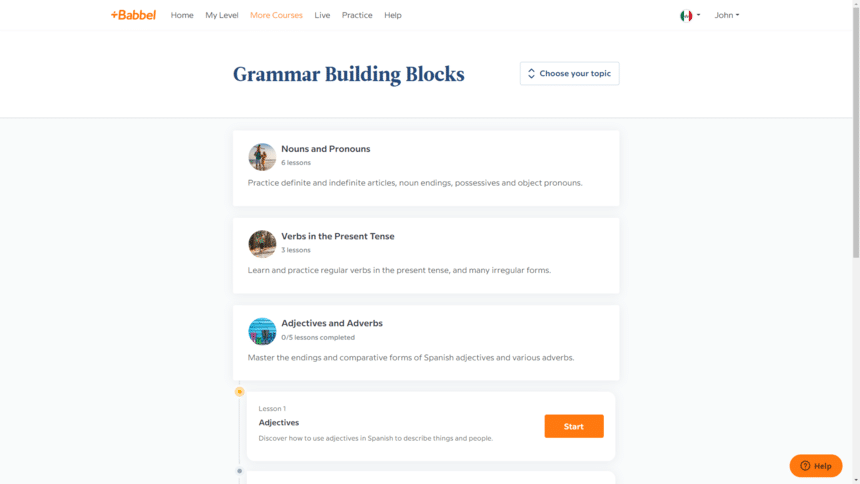
Babbel is one of the few remaining cheap learning programs (alongside Duolingo and Memrise). For budget shoppers, this is our pick.
Quick Summary
Babbel doesn’t offer the depth of instruction of other courses (like Rocket Spanish or Pimsleur), but it is absolutely perfect for beginners. Plus, at less than $10 per month, it’s a great budget learning option.
👉 Read Full Babbel Spanish Review
Pimsleur
- Monthly Subscription Plans
- Learn Online or Offline
Pros
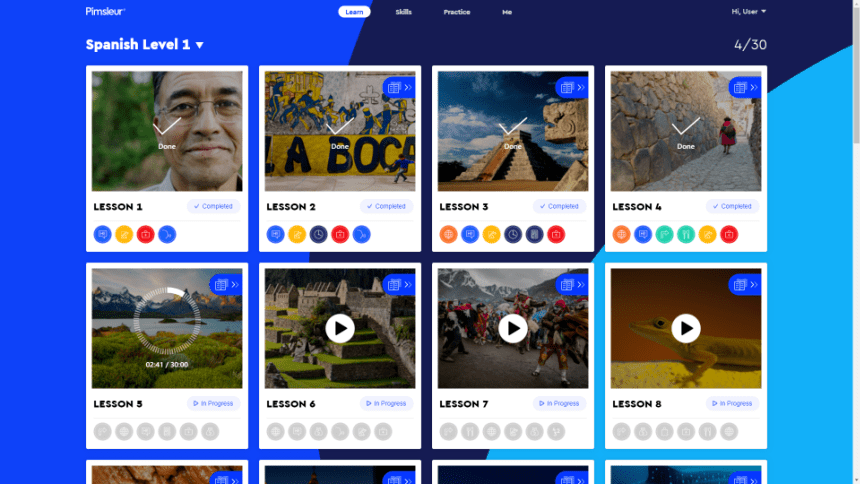
- Love how the app is based on in-depth audio lessons
- Useful driving mode feature (like podcasts, great for commuters)
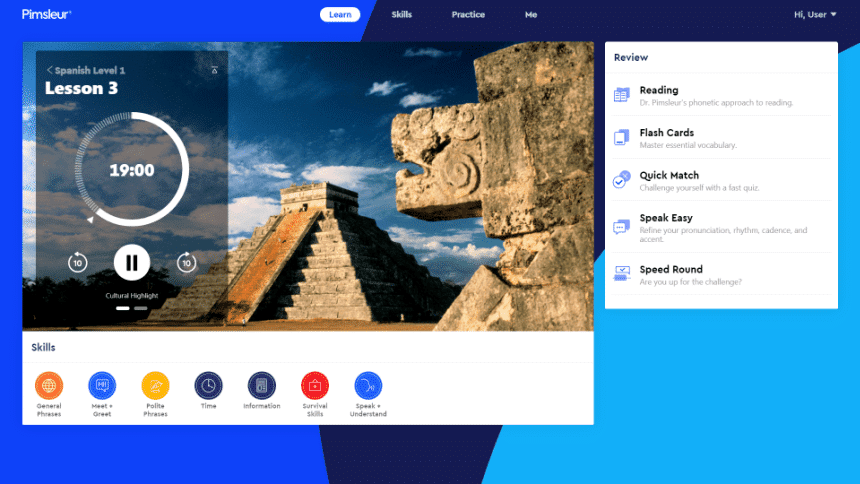
- Very cool platform with modern interface (sleek and responsive)
- Reinforcement drills post-audio lesson are highly effective for retention
- Liked the flexibility of month-to-month subscription
Cons
- Program felt kind of academic
- No images, video, or other visuals

Pimsleur: Your Next Best Alternative To Rocket Spanish
As I outlined above, we love Rocket Spanish. We think it is the best Spanish app in the game by a wide margin. But here’s the thing: Rocket also costs $180 or so (after discounts). It’s not cheap.
So if you’re looking for a similar program based on audio lessons, but without the big upfront cash outlay, look no further than Pimsleur.
In-Depth Audio Lessons
As noted, Pimsleur, like Rocket Spanish, uses an audio-centered teaching style. An English-speaking moderator walks you through the lessons and breaks down everything you need to know verbally.
We largely found the Pimsleur lessons to be useful, and the vocab they teach you sticks, but the lessons were a little bit more dry and academic than Rocket’s lessons. They teach you the formal way of saying things and touch on subjects that feel more adult. I guess that’s the best way I can describe it.
There’s nothing wrong with that at all, but if you’re looking for something younger and more casual, Rocket would be a better choice.
However, there’s no denying that the lessons are good. There are hundreds of hours of audio lessons; plus, they are in-depth and very accurate, and they teach you everything you need to know. You really can’t go wrong with them.
Driving Mode
One cool thing that sets Pimsleur apart from Rocket Spanish is their dedicated driving mode. I stumbled across the feature sort of by accident, but I consider it a game changer.
It makes listening to these podcast-style lessons really easy and enjoyable (sort of like Spotify’s car mode), and I used it a lot while buzzing around town.
So if you’re a commuter or long-haul trucker, or if you just find yourself in the car a bunch, consider Pimsleur Spanish.
Quick Summary
Pimsleur Spanish is like Rocket Spanish lite. We prefer Rocket’s course overall, but Pimsleur has the advantage of offering monthly subscriptions (Rocket does not), it has a special driving mode, and it is generally very academic.
👉 Read Full Pimsleur Spanish Review
Rosetta Stone
- Multiple Subscription Options
- Money Back Guarantee
Pros
- Ideal app for visual learners (entire program is built on images)
- Learning framework based on concept of immersion
- Affordable subscription packages (lots of deals on lifetime package)
- Useful bonus resources like Short Stories and Phrasebooks
- Modern and easy-to-use interface (great mobile app)
Cons
- Lessons can become tedious at times (somewhat repetitive)
- Left wanting more in-depth verbal/speaking practice
Rosetta Stone: Intimidating But Effective
When you first dive into the Rosetta Stone Spanish program, it’s a little intimidating. I’m not going to lie. This program is based on the concept of throwing you into the fire so you can learn like a native. Let me explain why that’s actually a good thing.
Being Immersed Works
The straightest blue line path to true mastery is immersion. There is no way around it. Want to learn to speak Spanish fluently as fast as possible? Move to Mexico City or Madrid for six months.
The problem, however, is that most people cannot afford to do this (whether because of time, work, money, or familial constraints). Rosetta Stone understands that and tries to replicate the process within its software program.
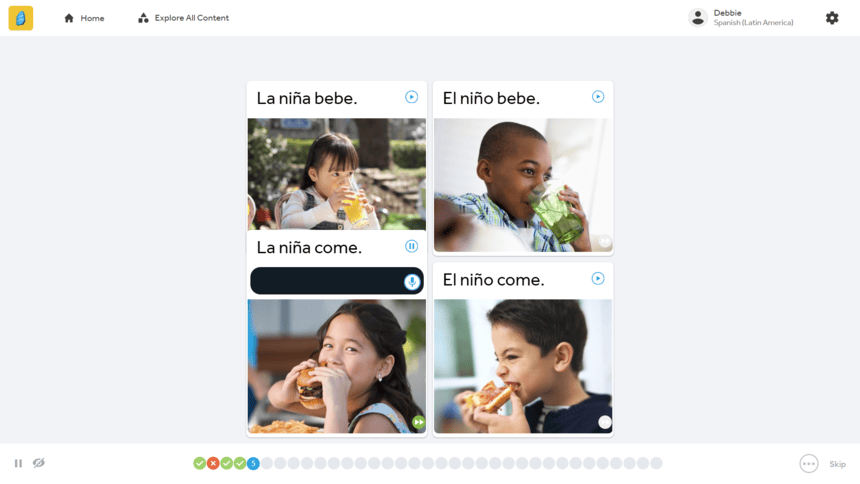
Rosetta Stone strips out all English translations and directions and tosses you straight into exercises. You’re asked to speak, listen, read, and write in Spanish from the first lesson.
The issue with this is that it can be highly intimidating and frustrating for some learners. When you don’t know what you’re supposed to do and you’re forced to make mistakes to learn, it can feel overwhelming and flat-out annoying.
But here’s the thing: it works. After the first few lessons, you get the hang of it, learn how the program works, and establish a baseline of vocabulary. And once you do that, you’re off and running.
The greatest benefit is that you end up associating the Spanish words you’re learning with the actual objects and actions they represent. In other words, you cut out English as a go-between and just start thinking in Spanish. Again, it’s frustrating and intimidating at first, but if you have the patience to stick with it, this method works.
Great For Visual Learners
As part of this learning framework, you constantly see images in the Rosetta Stone program. How else do you make someone associate a Spanish word with an object without telling them what it is in English? You show them a picture.
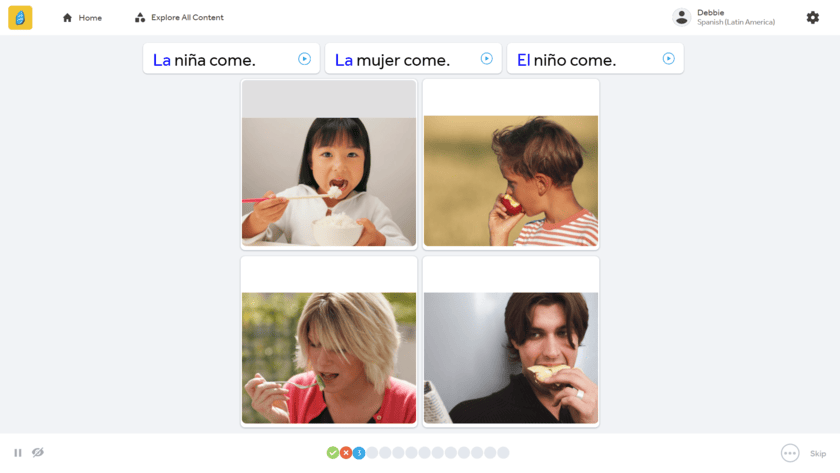
Every single exercise uses pictures to test you on newly learned words and phrases. That’s not to say they don’t include any options for speaking and listening practice. Rosetta Stone’s TruAccent speech recognition software is good – the program is just a little more oriented around images than dedicated audio lessons.
Beyond the main lessons, the program also includes both visual and audio features to enhance your learning, including Stories narrated by native speakers, the Seek & Speak augmented reality feature, and a Phrasebook for quickly picking up everyday vocab.
This makes the Rosetta Stone Spanish program perfect for highly visual people. If that sounds like you, Rosetta Stone needs your attention.
Quick Summary
Rosetta Stone’s Spanish program can be intimidating, and even irritating, with its immersive learning framework, but for visual learners and those that stick with it, boy does it work.
👉 Read Full Rosetta Stone Spanish Review
Lingopie
- Multiple Subscription Options
- Cancel At Anytime
Pros
- Very unique language learning method based on binge watching TV and movies
- Tons of useful features improve the learning process
- We used the playback speed feature and grammar tool a bunch
- Only $6 per month
Cons
- No set lesson plan or clear learning path
- Best suited for learners with some basic knowledge of Spanish

Lingopie: Maybe The Next Best Thing To Immersion
As I highlighted in the Rosetta Stone section above, immersion is the fastest path to learning Spanish. That’s exactly why I value Lingopie’s learning method: binge-watching TV shows and movies.
Premium Video Content
Lingopie’s approach to learning Spanish is simple – watch Spanish language shows and movies and learn along the way. Easy.
But there’s much more to it than just reading subtitles. They allow you to create flashcards with attached scenes, slow down the playback speed, color code subtitles, get grammar pointers, and a lot more.
It’s a very smart, effective way of leveraging TV to teach you Spanish.
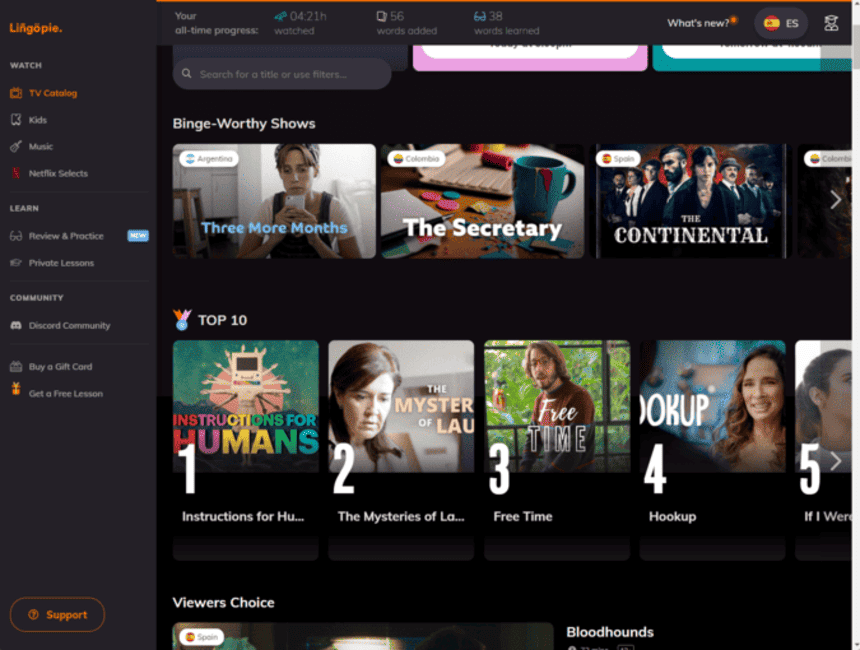
And the content they offer is premium. We’ve seen other apps, like Yabla and FluentU, use similar teaching methods, but they don’t have the content that Lingopie does. Lingopie is constantly expanding their video library with more high-quality shows and movies from every genre, with over 3,000 Spanish programs to choose from. No matter what you’re into, they’ve got plenty of options to fit your taste.
Whenever you want to mix things up, you can also access LingoPie’s Spanish podcasts, short stories, and audiobooks. It’s a truly multimedia experience.
Now, one downside with Lingopie is that there is no defined learning framework. You just login and start watching. There is no clear learning path (like you get with Duolingo) or structured progression through lessons (like Babbel Spanish).
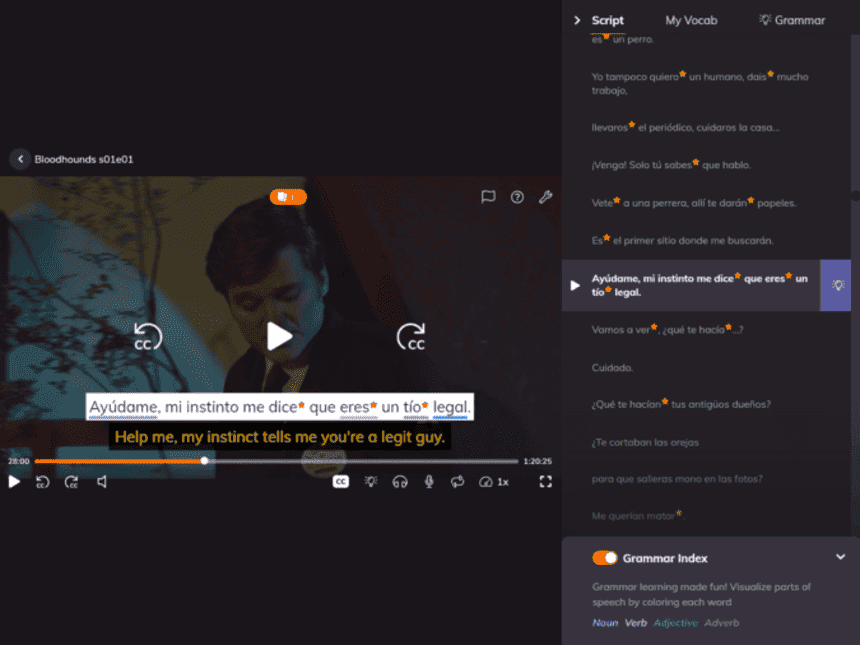
Basically, you just pick and choose what you want to watch and how you want to use the associated learning tools.
This can give the program a bit of an unstructured feel. However, to counter that point, Lingopie is really cheap.
Great Value
At about $6 per month for their annual plan, Lingopie offers tremendous bang for your buck. This is a very cost-effective option, so the fact that the learning framework is less organized is less of a concern, because you can use this program as a supplement to other Spanish language learning activities.
Quick Summary
I see Lingopie best utilized as a complement to another program (any of the other four highlighted above) or as a tool for more advanced learners. If you already have a B1 or higher level of fluency in Spanish, Lingopie would be great, as it does benefit those with some foundational skills.
👉 Read Full Lingopie Spanish Review
We’ve tested more than 20 different Spanish apps at this point, and they vary widely in their overall effectiveness. In the end, we found Rocket Spanish, Babbel and Rosetta Stone to be among the best, and they got our highest scores.
The typical Spanish app costs around $15 per month. Some apps only sell one-time purchase, lifetime access plans (like Rocket Spanish), but when considering monthly subscriptions, expect to pay about $6 to $20 per month.
Language apps are not as good as getting immersed in learning Spanish, but they are a perfectly viable alternative. Some work really well. The key is to dedicate time each day to learning.
How long it takes to learn Spanish can vary greatly depending on your time commitment and approach. If you go get immersed in Spanish culture, you can learn to speak in just a couple short months. If, however, you take it slow and just do a few short lessons each week through an online program, expect it to take closer to a year.