55% OFF + EXTRA 10%
Code: INSIGHT10
|
$8-$15/mo |
An excellent language learning app for beginners, offering short and engaging lessons designed to build foundational skills. It features a variety of interactive exercises and accurate speech recognition technology. |

Learn Today
Free Trial
|
$8-$13/mo |
Language learning app designed to help users build conversational fluency through AI-powered, interactive speaking exercises. Its lessons focus on real-world dialogues, providing instant feedback on pronunciation and sentence structure. |
Choosing the right language learning program can be challenging, and in this comparison, we break down the key differences between Babbel and Jumpspeak to help you decide which one best fits your learning style and goals.
Editor’s Choice
Babbel
- Multiple Subscription Options
- Money Back Guarantee
Pros
- Monthly subscription plans are quite affordable (less than $10/mo)
- Diverse mix of interactive drills and exercises
- Custom review sessions boost material retention
- Impressive speech recognition technology
- Modern, easy-to-use mobile app
Cons
- No video-based instruction
- Program caps out at the intermediate level
Video Review: Babbel vs Jumpspeak
In the video below, Bianca from the Guide2Fluency team compares the language learning apps from Babbel and Jumpspeak.
Reasons to Choose Babbel
To start, let’s review the major reasons you should consider using Babbel to help you learn a new language such as Spanish, Italian or German rather than Jumpspeak.
How Babbel Differs from Jumpspeak
These two apps are completely different, as they use opposite approaches to learning a language. Jumpspeak mostly just gives you free-form conversation practice, while Babbel is a more structured learning path.
Both apps touch on speaking, reading, writing, and listening, but Babbel mixes in grammar instruction and delivers it through a variety of engaging formats and activities.
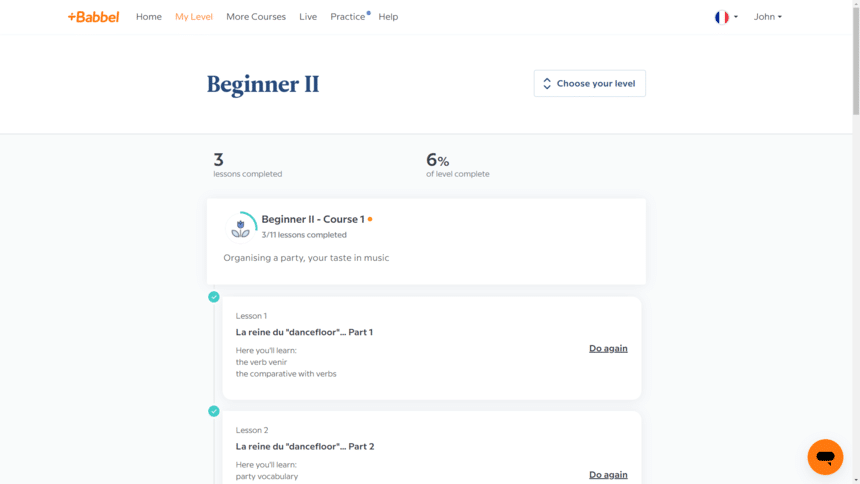
Plus, it keeps things interesting with personalized review sessions and extras like games, podcasts, and stories to help cement new vocabulary. It all comes together to make Babbel feel like a complete language-learning experience.
The main limitation with Babbel is that the program is more geared towards beginners and intermediate learners, but once you’ve worked your way up to advanced, there isn’t as much room to keep growing. If you’re already more or less proficient in a language, Jumpspeak will engage you more.
At the end of the day, the prices are fairly similar, so there’s no obvious winner. It comes down to what works best for you. That said, Babbel tends to have more discounts popping up, which might tip the scales for some.
Diverse Mix of Practice Drills
For our team, what makes Babbel stand out from Jumpspeak is the variety of exercises and activities it offers. Jumpspeak’s lessons are good, but they can start to feel a bit repetitive: you’re mostly cycling through multiple-choice questions or repeating phrases over and over, especially in the standard lessons.
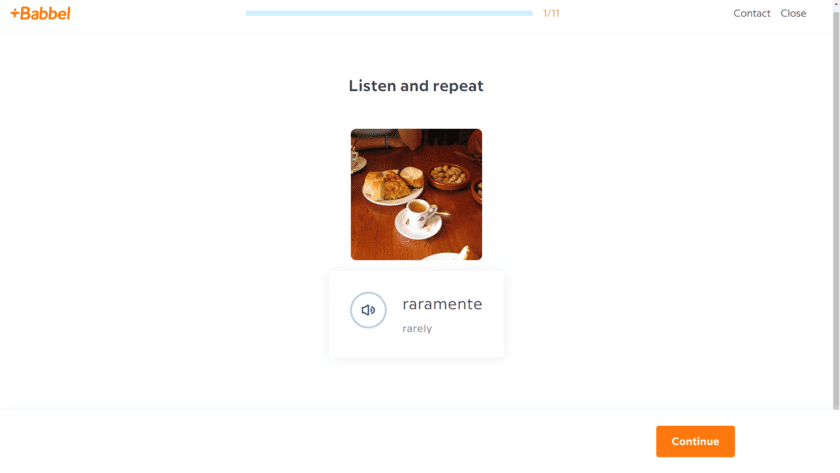
Babbel, on the other hand, keeps things interesting with a mix of listen-and-repeat exercises, digital flashcards, fill-in-the-blank drills, matching games, grammar insights, and even simulated conversations. This diverse approach keeps learning engaging and prevents that dreaded language-learning burnout.
And since lessons only take about 10 to 15 minutes, you never get bored. No matter how much you have going on, it’s pretty easy to knock out your Babbel lesson for the day and stay on track toward your goals.
Accurate Speech Software
One major advantage Babbel has is its speech recognition technology. Our team found it to be quicker and more precise compared to Jumpspeak. With Jumpspeak, there’s an annoying lag before and after you speak, which makes the experience feel a bit clunky. Plus, the accuracy isn’t always spot-on. During testing, one of us mispronounced “perro” with a hard “T” as “terro,” and it still counted it as correct.
Babbel does a much better job of catching those mistakes and giving reliable feedback during speaking exercises (kind of like Rocket Languages and Pimsleur). That extra accuracy makes a big difference when you’re trying to sharpen your pronunciation.
Custom Review Sessions
One of the biggest highlights of Babbel’s program is its daily review sessions, which our team enjoyed. Jumpspeak does offer a “Words” review feature, but it feels pretty basic in comparison.
Babbel makes review an essential part of the learning process. Almost every time you log in, you’re prompted to complete a quick review session that pulls vocabulary from previous lessons using spaced repetition. This means you’ll see words and phrases over and over, helping them stick.
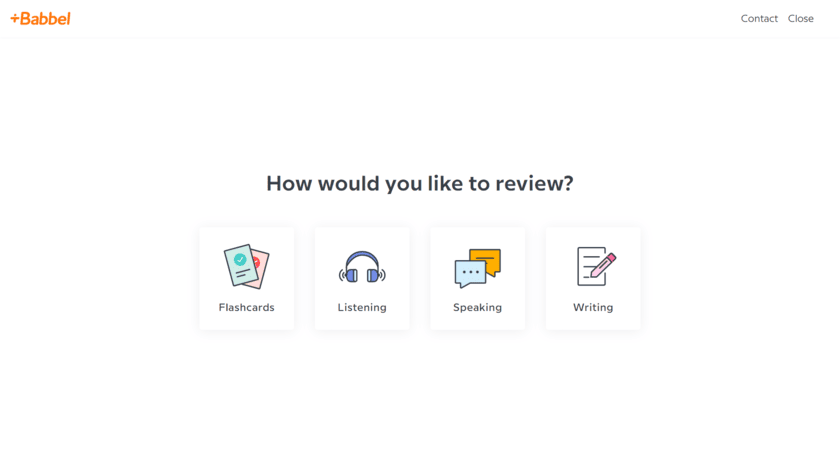
What’s even better is that you get to choose how you review: flashcards, listening, speaking, or writing. Our team’s favorite was the listening option, but having different ways to practice is a huge plus. Babbel’s review system is great at making new vocabulary and phrases actually stay in your memory.
Helpful Grammar Instruction
Jumpspeak does include some grammar insights, but you have to go looking for them, either by using their AI tutor or clicking on a hat icon during lessons. Babbel takes a much more hands-on approach, incorporating grammar into every lesson naturally.
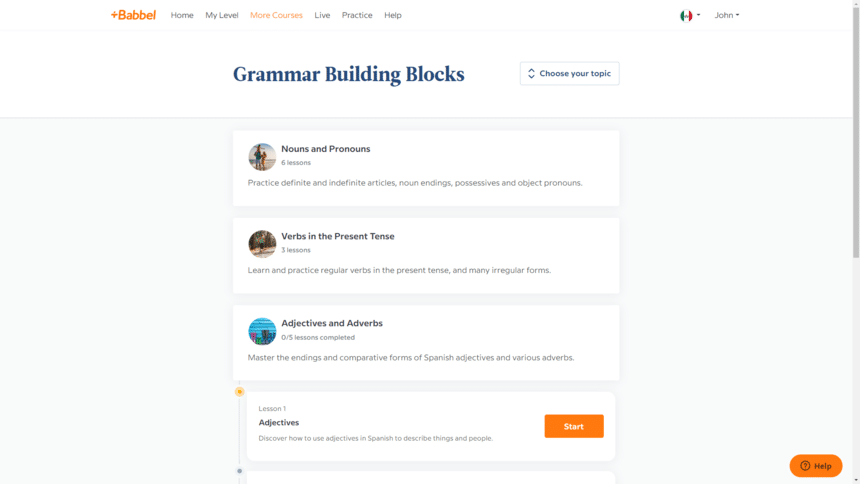
With Babbel, you’ll see dedicated grammar sections along with helpful pop-ups and callout boxes that break down key concepts as you go. It doesn’t feel like extra work; it’s just woven into the learning process in a way that makes it easy to absorb. Overall, Babbel does a great job of making grammar feel intuitive and effortless.
Modern Mobile App
When it comes to user experience, we have to give Babbel the win. Their app and platform are smooth, fast, and incredibly easy to navigate. Jumpspeak does have a sleek, modern look and is generally user-friendly, but it’s not without its issues.
During testing, I ran into occasional glitches that made things a bit frustrating, like the software not picking up on what I was saying, which made me lose the flow of the conversation. And I’m not alone; similar complaints pop up in user reviews and forums, so it seems to be a common problem. Babbel feels far more polished and reliable, making for a hassle-free learning experience.
Babbel Speak
If you’re on the fence between Babbel and Jumpspeak, this is the tool that you need to know about. Babbel Speak is a new feature that adds guided conversation practice to Babbel’s structured curriculum, so you’re getting more practice with speaking and listening. It’s still in Beta and only available for select languages at the moment, but this tool is great for building up confidence if you’re a beginner or you still don’t feel comfortable expressing yourself in the target language.
Plus, there are hints and images whenever you get stuck. I liked all the support you get with Babbel Speak, which made for a less overwhelming experience than simply being thrown into an open-ended conversation, like you get with Jumpspeak. If you’re getting started in a language or still fairly new at voicing your thoughts out loud in a language, Babbel Speak is a lot more supportive.

Jumpspeak
- 20 Languages
- Money Back Guarantee
Pros
- Quick lessons (only a few minutes per section)
- Video primers prior to each lesson are helpful
- AI tutor tool offers custom, personalized feedback
- Ability to adjust audio speeds aids in understanding
Cons
- App contains glitches in our experience
- Speech recognition technology is somewhat lacking

Reasons to Choose Jumpspeak
Now that we’ve discussed Babbel in detail, let’s change direction here and talk about the major reasons to use Jumpspeak to learn a new language.
What the Jumpspeak Learning Experience Is Like
Jumpspeak leans heavily on AI to immerse you in your target language, and they’ve got two key features that stand out.
First up are the bite-sized, AI-driven lessons. These are broken into four quick sections, each lasting just a couple of minutes. It starts with LISTEN, where you hear an audio clip and choose the correct response from a multiple-choice list. Then there’s WRITE, which feels like a casual text conversation—you type out your responses as if you’re messaging a friend.

Next is SPEAK, where you repeat words and phrases after an audio clip to fine-tune your pronunciation. And finally, there’s CONVERSATION, which is like an upgraded version of the Write section, except this time, you’re actually speaking your responses out loud instead of typing.
The lessons are pretty standard, nothing drastically different from what you’d find in other language apps.
Where Jumpspeak shines, though, is with its AI tutor. This is where things get interesting. The tutor lets you engage in free-flowing conversations on topics like food, work, or friendships.
The best part? You can say whatever you want, and the AI adapts, keeping the chat going and providing personalized feedback. It’s interactive and designed to get you comfortable with real-world conversations.
Video Primers
One thing that sets Jumpspeak apart is its use of video, and our team found this to be a major highlight (similar to Memrise). Most lessons kick off with a short explainer video featuring a native speaker who introduces the topic, walks through key points, and shares real-world examples.

This is a big win for Jumpspeak, especially when compared to Babbel. Babbel relies heavily on text and simple images but doesn’t incorporate video at all, which, in our opinion, is a missed opportunity. Video does more than just teach; it helps you connect with the language. Seeing fluent speakers in action, their facial expressions, gestures, and body language, makes the learning process more engaging and reinforces new vocabulary in a way static text just can’t.
Helpful AI Tutor
Let’s talk about Jumpspeak’s core feature: their AI tutor. This is easily their standout feature, and it’s a pretty brilliant concept. Think of it as your personal language coach, available anytime you need it. Many people find it easier to start having practice conversations with AI rather than a human, because when you’re practicing with an AI conversation partner, no one is judging you.
That can also be a bit of a downside, because you don’t want to use the AI as a crutch that prevents you from jumping into actual conversations with fluent speakers. In my experience, the AI can be a little too forgiving sometimes. It doesn’t interrupt you or correct you as much as a real person would, so keep that in mind with AI tools.
You choose a topic, and suddenly, you’re in a back-and-forth conversation with the AI. It walks you through real-world situations, whether it’s ordering food at a restaurant or talking with your boss.

Need something more tailored? No problem. You can create your own scenarios, like planning a camping trip or learning how to cook empanadas. The AI adapts well; it can act as a teacher, a guide, or just a casual conversation partner based on what you need. It gives real-time feedback on pronunciation, phrasing, and grammar, although a major downside here is that the technology isn’t always accurate. Since this is primarily a speaking and listening tool, I’d expect the speech recognition software to be spot on, so I was disappointed by all the glitches.
While the AI suggests responses to keep the conversation flowing, you’re free to go off script and reply however you like. It feels natural, flexible, and completely personalized to your learning style.
Overall, we’re big fans of this tool because it goes beyond just memorizing words. It helps you practice real conversations in a way that builds confidence and fluency faster.
Customize Audio Speed
Let’s wrap this up with a feature our team loved: Jumpspeak gives you full control over how fast native speakers talk during drills and exercises. It might sound like a small thing, but trust us, it makes a huge difference.
Here’s how it works: in the settings, you can slow the audio down to as low as 50% speed. And honestly, this is a game-changer. Dropping the pace helps you catch every little nuance (pronunciation, tone, and rhythm), making it way easier to absorb new vocabulary and refine your speaking skills.
It takes the pressure off. Instead of feeling overwhelmed by fast-talking native speakers, you can gradually build up your confidence at your own pace. It makes learning feel more approachable, less stressful, and ultimately more rewarding as you work toward natural, real-world conversations.
Verdict: Jumpspeak or Babbel for Language Learning?
At the end of the day, both Babbel and Jumpspeak have their strengths, but our team agrees that Babbel comes out on top as the more well-rounded language learning program.
Jumpspeak definitely has some cool features, like its AI tutor and video explainers, and we can’t deny those add value. But if you’re a beginner starting out in a language, Jumpspeak wasn’t designed to teach you the basics. You need a more guided app like Babbel for introductory vocab, grammar, and a clear path that gets you from beginner to intermediate.
Babbel delivers the full package: diverse practice exercises, solid speech recognition, personalized review sessions, and grammar integration. Use it to build your foundation in a language, and add in Jumpspeak when you’re ready to start handling more advanced conversations.
If you’re serious about picking up a new language and want a proven program that keeps you on track, Babbel is the way to go.
Babbel offers a well-rounded language learning experience with structured lessons, diverse exercises, and built-in grammar instruction, while Jumpspeak focuses more on AI-driven, conversation-based learning with video explainers and real-time speaking practice. Both have their strengths, but Babbel provides a more comprehensive approach, whereas Jumpspeak leans into AI-powered immersion.
For most beginners, Babbel is the better program, as it gives you a structured learning path and builds a more well-rounded foundation in a language. Jumpspeak is great for AI-driven speaking practice and real-time conversations, while Babbel offers grammar instruction, varied exercises, and personalized review sessions.